Cloud storage and NAS files in your AI tools
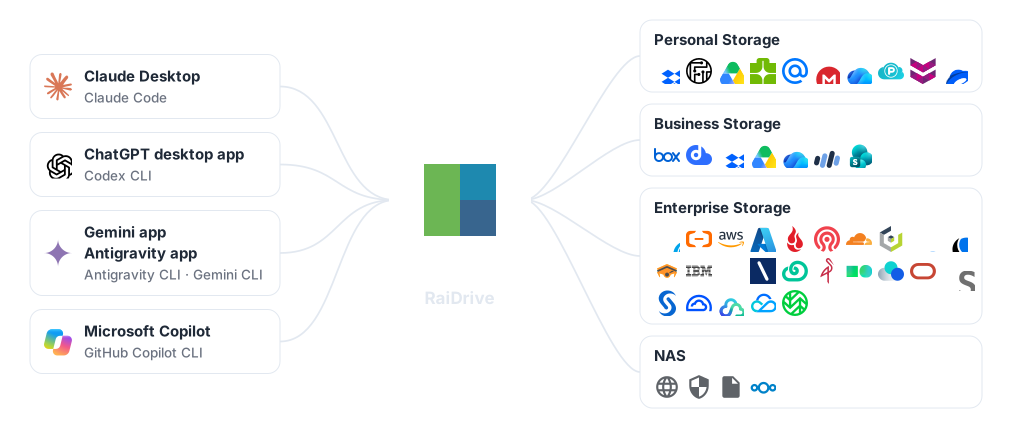
RaiDrive puts Google Drive, OneDrive, Amazon S3, your NAS and every other storage it supports on a drive letter. AI tools work on that drive like on a desktop folder, so you don't download the files first.
 Claude Desktop
Claude Code
Claude Desktop
Claude Code
 ChatGPT
Codex
ChatGPT
Codex
 Gemini
 Antigravity
 Microsoft Copilot
 GitHub Copilot CLI
How it works
Connect the storage
Connect Google Drive, OneDrive, Amazon S3 or a NAS in RaiDrive — for example as Z:.
GuideOpen the folder in the AI tool
Open or attach a folder on that drive, such as Z:\Documents.
The AI tool works there
It reads the files, and a tool that works in a folder writes its results there too.
You don't set up a storage connector (an add-on that links one service to the AI tool) in the AI tool. The AI tool opens the RaiDrive drive as a folder on your PC — the same way for personal and business clouds, S3-compatible storage and NAS.
From Excel to PowerPoint
The AI tool reads the workbooks in the cloud folder, then creates and saves the presentation.

Claude Desktop works on the attached folder.
Choose your AI tool
Each guide shows the steps with real screens.
Keep your files safe
An AI agent can change, rename and delete files. On a RaiDrive drive those changes reach the storage, so set the drive for the job.
Read-only
Windows refuses every change on the drive. The AI tool reads the files but cannot change or delete the originals.
Only the folder it needs
Mount one folder instead of the whole storage. The rest does not appear on the drive.
See what it opens
The process monitor lists the files the AI tool reads (R) and writes (W).
Connect your storage and open it in your AI tool
Install RaiDrive, connect a storage, and follow the guide for your AI tool.
RaiDrive itself has no AI features. To an AI tool, a RaiDrive drive is an ordinary drive. Product names are trademarks of their owners. Trademarks
Questions
Does the AI tool download my whole storage?
No. RaiDrive transfers a file only when the AI tool uses it.
Does RaiDrive have AI features?
No. RaiDrive connects your storage as a drive letter. The AI tool works on it like on any other drive.
Can the AI tool change or delete my files?
A tool that works in a folder can. Connect the drive read-only when the AI tool only needs to read.
Which storages work?
Every storage RaiDrive supports: personal and business clouds, S3-compatible object storage, and NAS or servers over WebDAV, SFTP and FTP.